
Unless you, like me, are a bit of a geek, you'll be unlikely to have seen the news recently that Microsoft have stopped PC manufacturers from selling Windows XP. This was always on the cards - indeed, the original plan was to stop XP sales by the end of January, and it was only when customers complained loudly that the date was extended until the end of June.
Despite not having actually reached that date yet, a lot of manufacturers have already stopped selling XP. I wandered into my local PC World yesterday (I'm probably going to get a new desktop pretty soon – my poor little laptop is coughing and wheezing more than ever just at the moment) to see what the situation was, and the girl on the customer support desk – who, to make a completely irrelevant observation, was extremely attractive – informed me that the only way they could give me a PC with Windows XP on it would be to sell me a Vista PC, then take Vista off it and "upgrade" it to XP.
I'd heard of this trick before, but on being informed that I'd have to pay the cost of Vista, the cost of XP, and an extra fee for switching between the two, I decided that this really wasn't an option. No matter how pretty their customer support reps may be, PC World are going to have a hard time selling me a system with a massive markup on it just because I want an older piece of software.
The really unfortunate part of the whole issue is that the people who get hurt most by this are the retailers, like PC World. Microsoft itself might take a small hit in sales, but its business customers will probably make up for that for the most part. The retailers, though, are going to have quite a few people like me simply turning away and either going online to the few places that do still have stock of XP, or going away from Windows altogether into the arms of Apple or Linux.
Personally, I'm going to try the online route, but the idea was always to switch to Linux as my primary OS. Wine has now reached version 1.1, so it's possible that I can get away without using Windows at all. And if I – a technically literate person, but no technical genius – can realise that, then so can the very many other people like me, and Microsoft are going to see a fall in their market share. It seems like Microsoft are increasingly determined to shoot themselves not only in their foot, but in the feet of anyone who comes anywhere near them.
Friday, 27 June 2008
Seems like Bill Gates got out at just the right time.

Wednesday, 14 May 2008
Even if it is clichéd, having a gunfight on snowmobiles is pretty badass
I was watching Die Hard 2 last night with my sister (I'm slowly working my way through the quadrilogy), and we slowly realised that there really aren't that many elements in your average action film. Really, once a bunch of things have blown up, some people have shot some other people, and there's been a car chase the length of Los Angeles, you have a film that everyone has already seen fifty times, and yet is compelling viewing.
I'm not saying this is necessarily a bad thing — indeed, it means you know what you're getting — but it does rather lend itself to people coming up with daft things to do during the film.
In a plot twist that absolutely no-one will be surprised about, my sister and I managed to come up with such an activity, and I coded up a simple version of it today - Action Movie Bingo! Get yourself a bingo card, watch out for the recurring elements in the film you're watching, and try to get five in a row.
My implementation of Action Movie Bingo is now up on Ballpoint Banana - go and have a look (reload the page to get a new card, click an element to mark it off) and play along to your heart's content. Any comments are very welcome. Unless they're along the lines of "You have far too much free time", because I already knew that.
Thursday, 20 March 2008
RISC OS didn't use menu bars, for the record. Anyone else remember RISC OS?
Microsoft do sometimes get an unnecessarily bad rap when it comes to software. Although it's fashionable to say that they're evil, in it for the money and technically incompetent - and Clippy does make you wonder - they have produced some superb work. Excel, for instance, is one of the most useful products on the market, and is particularly notable in that its open-source alternatives are just not that good when it comes to advanced features.
(This may, of course, be because a spreadsheet application can have advanced features that are not patently ridiculous. I very much doubt that anyone has ever said "no, you should buy Word instead of its competitors because you might miss out on the AutoSummarize tool".)
In fact, Microsoft has made quite a few very good products, and I still use some of them. MSN Messenger (sorry, "Windows Live Messenger") is one of them, used because Pidgin doesn't support webcam chats, voice chats or handwriting. Gimmicks, certainly, but they are fun gimmicks and I see no point in moving away from them just yet.
The other thing that Microsoft does very well is maintaining a consistent style. This style isn't always very attractive - almost the first thing that I did when I got the (XP-running) laptop that I'm currently using was to switch off the garish, jellybean-coloured theme and use the Windows 2000 one instead. There's just something classy about blue window title bars and grey buttons, an impression that I've had because Microsoft has stayed with that style since Windows 95 came out. Despite XP trying to foist its jolly colours on me, it does at least give me the option of turning them off.
This brings us back to Windows Live Messenger, because a few days ago I installed its latest update. The update doesn't actually change very much in terms of functionality, but it does one thing that Windows Media Player 11 did before it. See if you can spot it.
This one's the previous version (from msgweb.nl)...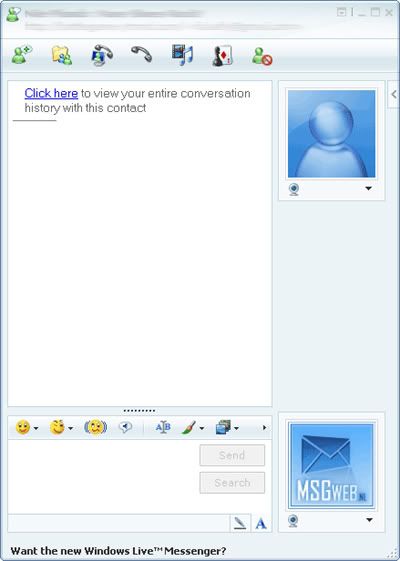
...and this is the updated version.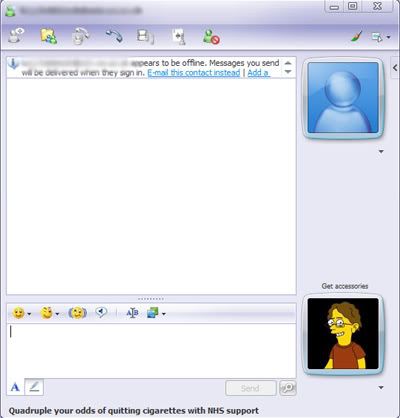
Yes, the only major difference (apart from that dashing young gentleman in the updated version) is the change in the style of the buttons up in the top right. Now, I'm aware that the buttons in the older version aren't in the standard Windows style. However, they are roughly the same size as the standard, and the icons are so similar that it still fits in with any XP theme.
I didn't realise that the new buttons were significant until I compared them with the ones in Windows Media Player 11. The design is exactly the same in that program, which tipped me off to it being a wider phenomenon. And then, of course, I saw a computer running Vista.
It's not a new theme that two programs happened to use, it's the standard Vista theme. Which is being pushed onto XP customers. In other words, they are deliberately breaking some of XP's functionality (style consistency) in order to make people want to switch to Vista.
I would say that this is one of the worst decisions that Microsoft has ever made, except that recently they have come up with some even worse ones. Internet Explorer 7, for example (which I avoided by not downloading the automatic update - seriously, who delivers an entire browser through their security patching system?), has a good try at hiding the menu bar. Windows Live Messenger does the same, but that's less noticeable as you hardly ever use the menus. And so does the latest version of Office, exchanging the menus and toolbars for an unholy blend of the two.
It may not sound like a big deal to get rid of the menu bar. But step back for a second and consider that, ever since the invention of graphical user interfaces, menus have been right there. Windows version one had a menu bar. It's not just Microsoft, either - Apple used them, the X Window System (the GUI for most Unix-like systems) uses them. Personally speaking, it is practically hardwired into my brain that if I want to open a file, I go up to the "File" menu at the top left.
In short, changing the user interface this much is a massive "SCREW YOU" to all the users who have stuck with Windows since its invention, as well as tacit confirmation that Microsoft couldn't care less about attracting Apple's customers or users of other operating systems. It is the most staggeringly bad software decision they have ever made, and has further convinced me never to get Vista.
Still, Excel is pretty good...
Wednesday, 30 January 2008
National Treasure 3: The Legend of the Elonex Prosentia is just around the corner
Although I'd consider myself to be at least mostly competent when it comes to software, I'm embarrassingly bad at dealing with the hardware part of IT. This is odd, because I like to take apart practically everything else (see this post for evidence) - I can only assume that I've never had to rummage around in the bowels of computers because I've never bothered upgrading them.
Last night, though, I had to double the number of hardware upgrades I'd ever performed (the first was when I stuck some more RAM in my laptop last year, a process which is not exactly difficult) by installing a new DVD writer in my family's desktop PC. Now, I was fairly well prepared for this operation, as there are loads of instruction sites kicking around online. The one I used was off About.com, and was very helpful - sadly, it failed to cover one of the most basic and yet most fundamental aspects of the whole process. Namely, opening the computer's case.
You might have thought that opening a case was fairly easy, and in most cases it would be. My family, though, saw fit to buy an Elonex Prosentia computer, the designers of which apparently had a profitable sideline building high-security safes. The only obvious screws on the casing were the ones holding the power supply together - I came very close to dropping it onto the motherboard - and the only one that wasn't anywhere near the power supply didn't seem to do anything when unscrewed.
At this point, I looked through the manuals and had no joy. So I had to bite the bullet and do what every self-confessed geek hates, the equivalent of stopping to ask for directions with a sarcastic girl in the car. That's right. I called tech support.
I was prepared for the usual hell of tech support, which usually involves listening to the Four Seasons being played in very poor quality while a saccharine voice informs me that I've reached number 57 in the queue. What I wasn't prepared for was the information that Elonex now existed in name only, having folded back in 2006. It took a while for the tech support people to get this point across to me, along with the fact that no-one now had the faintest idea about any details of their computers, let alone how to get past the labyrinthine security of their desktop cases.
In desperation, I phoned the company that had been used to run Elonex's remaining contracts when it went into administration. The young lady I spoke to there was very eager to help, but didn't seem to have mastered that when you silently put your customers on hold, you're supposed to tell them what you're doing. If you don't, what happens is that the employee and customer embark on an entertaining game of "hello-hello? Can you hear me - hello?" for a few minutes before one or both gives up in disgust and hangs up.
In the end, it took a thorough investigation of the entire case along with my dad before we managed to get the case to slide back and lift off. I'm still not entirely sure what finally got it going, but I suppose I can at least be grateful that I was unsuccessful in ripping the entire front panel off (that was becoming a definite option at one point). I now pass this story on to you - not so much for the benefit of those who are reading my posts regularly, and who at this point are probably thinking "an entire article dedicated to his sheer incompetence and inability to open a computer's case? Really?", but more for those who at some point in the future are going to stumble across this post by entering some combination of "Elonex", "Prosentia", "case" and "I am seriously considering getting a sledgehammer" into Google. To those people I now present the following short list.
How to get into the case of an Elonex Prosentia PC
I hope it's a long time before I have to do that again...
Saturday, 12 January 2008
Badgers are funny, too. So are grizzly bears, but not brown bears. Weird, eh?
Have you ever noticed how some animals just have more comedy potential than others? I'm not entirely certain why this should be, but it's definitely the case. Cows, for example, are automatically funny. Just ask Gary Larson. Monkeys, too, are funny, as are iguanas. So are sloths. Mice are sometimes the cause of comedy in others, but they're not inherently funny in themselves; chinchillas are funny, labradors are not. The list goes on, and I imagine there's a certain amount of personal preference involved.
There are two principles, however, that I want to stand by firmly. These are:
- Squirrels are funny;
- The world could use more surreality.
With these principles in mind, I embarked on a little adventure into programming. This was the result.
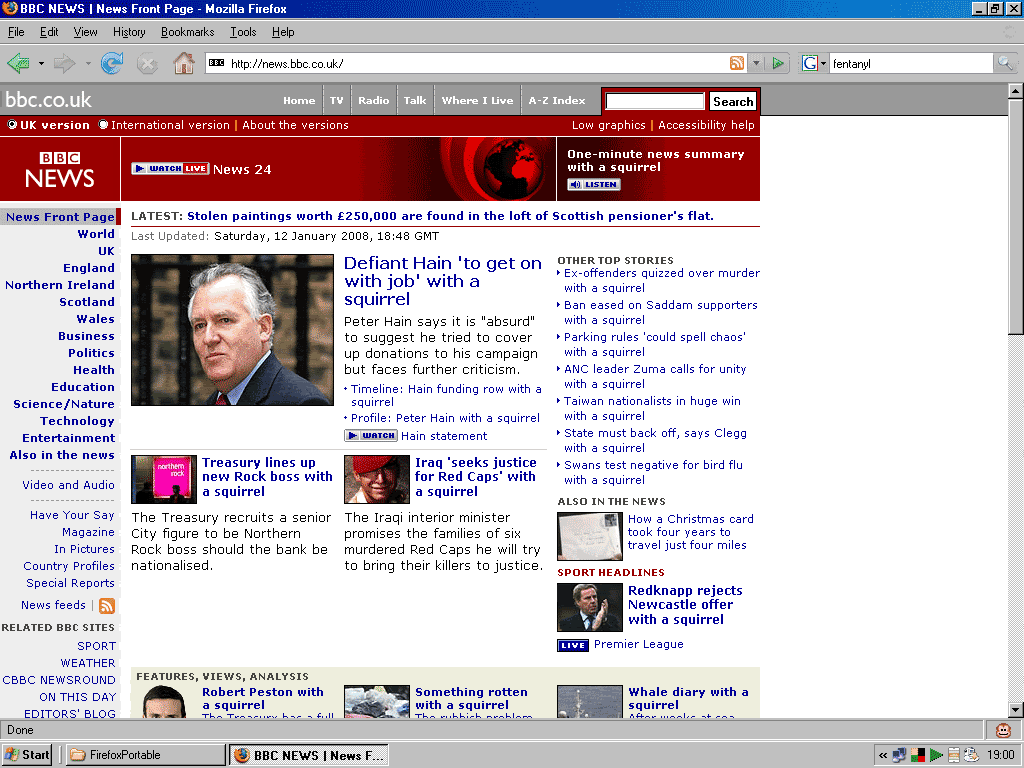
click to expand
If you'd like to perform the same trick yourself (or modify it), you'll need to be running Mozilla Firefox with the Greasemonkey extension. I've included the code behind the cut below. I'm very new to Greasemonkey, so the code's pretty ugly - if you'd like to tidy it up, please feel free. Install at your leisure, and enjoy the weirdness.
UPDATE: Almost forgot to mention that the idea for this is largely based on the CNN Fortune Cookie, created by Ironic Sans, and uses sample code from Dive Into Greasemonkey. Wouldn't want you to entirely blame me...
// ==UserScript==
// @name           BBC News Headline Editor
// @namespace      http://philonoism.blogspot.com
// @description    Adds a custom text string to the end of BBC News headlines.
// @include        http://news.bbc.co.uk/*
// ==/UserScript==
var prefix = ''
var phrase = ' with a squirrel' //change the prefix and phrase to whatever you want
var allA, thisA;            //to append to the headlines
allA = document.evaluate(
    "//a[@class='tsh']",
    document,
    null,
    XPathResult.UNORDERED_NODE_SNAPSHOT_TYPE,
    null);
for (var i = 0; i < allA.snapshotLength; i++) {
    thisA = allA.snapshotItem(i);
    // do something with thisA
    thisA.innerHTML = prefix + thisA.innerHTML + phrase
    }

allA = document.evaluate(
    "//a[@class='shl']",
    document,
    null,
    XPathResult.UNORDERED_NODE_SNAPSHOT_TYPE,
    null);
for (var i = 0; i < allA.snapshotLength; i++) {
    thisA = allA.snapshotItem(i);
    // do something with thisA
    thisA.innerHTML = prefix + thisA.innerHTML + phrase
    }

allA = document.evaluate(
    "//a[@class='tsl']",
    document,
    null,
    XPathResult.UNORDERED_NODE_SNAPSHOT_TYPE,
    null);
for (var i = 0; i < allA.snapshotLength; i++) {
    thisA = allA.snapshotItem(i);
    // do something with thisA
    thisA.innerHTML = prefix + thisA.innerHTML + phrase
    }

var allDiv, thisDiv;

allDiv = document.evaluate(
    "//div[@class='arr']",
    document,
    null,
    XPathResult.UNORDERED_NODE_SNAPSHOT_TYPE,
    null);
for (var i = 0; i < allDiv.snapshotLength; i++) {
    thisDiv = allDiv.snapshotItem(i);
    // do something with thisDiv
    var a_list = thisDiv.getElementsByTagName('a')
    for (var j = 0; j < a_list.length; j++){
        thisA = a_list[j];
        thisA.innerHTML = prefix + thisA.innerHTML + phrase
        }
    }

allA = document.evaluate(
    "//a[@class='pbl']",
    document,
    null,
    XPathResult.UNORDERED_NODE_SNAPSHOT_TYPE,
    null);
for (var i = 0; i < allA.snapshotLength; i++) {
    thisA = allA.snapshotItem(i);
    // do something with thisDiv
    var b_list = thisA.getElementsByTagName('b')
    for (var j = 0; j < b_list.length; j++){
        thisB = b_list[j];
        thisB.innerHTML = prefix + thisB.innerHTML + phrase
        }
    }

var allUL, thisUL, thisLI;

allUL = document.evaluate(
    "//ul[@class='popstoryList']",
    document,
    null,
    XPathResult.UNORDERED_NODE_SNAPSHOT_TYPE,
    null);
for (var i = 0; i < allUL.snapshotLength; i++) {
    thisUL = allUL.snapshotItem(i);
    // do something with thisDiv
    var li_list = thisUL.getElementsByTagName('li')
    for (var j = 0; j < li_list.length; j++){
        thisLI = li_list[j]
        var a_list = thisLI.getElementsByTagName('a')
        for (var k = 0; k < a_list.length; k++){
            thisA = a_list[k];
            thisA.innerHTML = prefix + thisA.innerHTML + phrase
            }
        }
    }
Friday, 4 January 2008
This is not an advertisement. I just get a little enthusiastic.
I mentioned some time back that I'd been searching for a decent free music player and library program, and that I was having some severe problems with this task. In fact, I may even have been so rash as to say that Windows Media Player 10 was the best that I could find.
Not any more.
I may as well state at this point that I have freakishly stringent requirements for music players. This can seem rather ridiculous, given that I'm more than happy to just use a CD player if I have the disc to hand, but then the old factor of "I never knew this product existed and now I must have the best version of it possible" kicks in. Anyway, here are the features that WMP10 had, and why they were important to me...
(And makes the menu bar extremely difficult to find. The menu bar. Possibly the most standard feature in computing over the past 15 years, and they try to get rid of it. Complete insanity.)
Strange as it may seem, for months I couldn't find anything other than WMP10 that could do all of these things. Winamp can play WMAs, but has a truly bizarre library layout (or it did last time I tried it, anyway); iTunes is just as locked as WMP and lacks the right kind of 2-pane layout; RealPlayer is simply ugly (and who uses RealAudio any more?); and the simpler options like foobar2000 and VLC don't have adequate library functions.
This was unfortunate, as what I was really looking for was something that could also do the following things.
I've been keeping an eye open for players with this functionality for quite a while now, but had almost always been disappointed. So when, fairly recently, I heard about the beta version of MediaMonkey 3, it was almost unreasonably exciting. I tried MediaMonkey back when it was in version 2.something, but didn't like it much. It got many things right, but it was ugly and difficult to use. The mini-player, in particular, took up much of the system tray and constantly got in the way. So when I downloaded the beta and found that not only had they added several functions, they had also overhauled the entire interface and made it much sleeker, it was a good sign.
And then, at the end of December, it came out of beta. I downloaded it a couple of days ago, and have yet to see any major bugs. It's fast, clean, functional and (mostly) free - the functions that you have to pay to unlock aren't those I'd want anyway. I haven't yet tried to rip or burn CDs with it, but WMP was never all that reliable for those functions anyway. The design is good - in particular, nothing on the mini-player takes more than one click. Flexibility is found throughout, letting you resize and reorder practically everything. It's built on much of the same basis as Winamp, so plugins and extensions for Winamp will usually work on MediaMonkey too. I think my quest is at an end.
(Man, I need less geeky quests.)
Friday, 19 October 2007
It's very important to give this kind of geek something to do. Bad things happen otherwise.
For some reason, the market for video games appears to be filled with people who don't actually want the games that they've bought. No, what they wanted was something nearly the same as their purchase, but not quite. Welcome to the world of game modding.
According to some sources, the earliest mod was a Castle Wolfenstein chop job called Castle Smurfenstein. Quite why the author of this game felt the need to replace Nazis with Smurfs is unclear, although I suppose the Second World War would have been over rather faster if all we'd had to do was assassinate Papa Smurf. Anyway, since then barely a game has been produced that hasn't been modified extensively by its purchasers. Even console games haven't escaped, thanks to gadgets like the Action Replay, allowing gamers to modify the system memory's contents.
The difference between using an Action Replay and modding a PC game is fairly simple - an Action Replay can only modify things that are currently in the game, whereas a PC mod can introduce entirely new things. That said, sometimes Action Replays can be used to discover things that the developers put into the game but subsequently didn't use, to the embarrassment of the game's distributors; Rockstar's revelation that Grand Theft Auto: San Andreas contained an unfinished sexual mini-game (the so-called "Hot Coffee" feature) is one obvious example. (Incidentally, the outcry over that issue strikes me as very odd - the whole game requires you to kill, maim and steal from various other people, but it's unacceptable to show simulated consensual sex on-screen?)
Obviously, then, PC mods are the most flexible type, and some people have seriously gone to town on changing their games to look like they wanted. Developers, for their part, have responded in a remarkably positive way. All of the fairly recent games in the Microsoft Flight Simulator series have had an open structure explicitly designed for users to make and fly their own planes; some of the Jedi Knight series, among many others, have options in the main menu for importing mods; and then, of course, we have the Half-Life games.
Half-Life and its sequels, easily some of the most popular and critically acclaimed games ever made, are also built on well-documented engines that make it very easy for other developers to make entirely new games on top of the old ones. The classic success story here is Counter-Strike, a mod for Half-Life that was so incredibly successful, Valve (the original publishers of Half-Life) ended up bundling it with Half-Life itself. Other mods have had similar successes - Garry's Mod, built on top of Half-Life 2, is such a useful tool that it's now being sold commercially. (And it's been used for some awesome bits of fan art, too, notably the webcomic Concerned.)
As you'd expect, the open-source community has got in on the action too, as people have created open-source remakes of brilliant games like Liero. (Many of you are now saying "I've never played Liero." To you, I can only say: Your youth was not complete.) Gusanos is one such remake, and of course it has also been modded extensively. Any game that, casting you as a homicidal intelligent worm trying to kill all your opponents, also provides you with a ninja rope, a lightsaber, and the ability to shoot lightning, must be worth playing.
Ahh, wonderful.
Now that we've established quite how awesome the concept of modding really is, take a moment to wonder why it's not present to the same extent in other software. Programs like Microsoft Word do accept "add-ins"; Windows Media Player can have extra visualisations and information processors; and yet, there's very little widespread use of these functions. The only program that comes to mind with an equivalent level of extensibility is Firefox, and that's open source, so it's much more to be expected. Perhaps software publishers are afraid that they'll lose custom if they don't have control over their products; however, gamers aren't avoiding new games in favour of mods. Rather, they're enjoying them even more.
It's entirely possible that the effect of not allowing full modding is to drive customers to completely different products. Music fans who want lots of functionality (such as full Ogg Vorbis support) don't try to mod Windows Media Player, they download Winamp; customers dissatisfied with Office download OpenOffice. And, of course, there's Linux - arguably, the closed nature of Windows has been a spur for developers to look elsewhere if they want the best performance from their programs. Whether that's true or not, it's definitely something to think about.
In the meantime, I'm off to fly an X-Wing through the middle of Tower Bridge.
Monday, 24 September 2007
Or we might just get 200 million new Myspace accounts. WHO KNOWS?
It's finally looking like the One Laptop Per Child project is getting into its production and distribution phase. For those of you who haven't heard of OLPC, it's aiming to provide sub-$100 laptops to children in the developing world in order to help in education - not only IT education, which is going to be increasingly important in the years to come, but also because this increases internet access for general education purposes. (Feel free to insert jokes about how they'll be highly educated in poor grammar, Youtube videos and porn here.)
I've thought for some time that OLPC was an excellent idea. Admittedly, $100 is a lot for a family, or even for a school, in countries where the average daily wage is under $5, and there are countries where providing food is rather more important than providing internet access. However, given the explosion of new technology in a lot of terly brilliant. I've recently been struggling with getting computers to talk to each other over a wireless network and share an internet connection, but it's remarkably difficult. The fact that only one laptop on the network needs to have this connection for all connected machines to have access - and the fact that this all apparently just works, with no fiddling around with settings - sounds like some kind of technological nirvana.
Then there's the power supply. The number of times I've had to plug my laptop in after its embarrassingly short battery life failed it yet again makes me want a wind-up computer so very, very much. It's not just wind-up, either - one way of powering the computer is to use a foot pedal. Any computer that can make you feel like you're using a vintage sewing machine gets my vote for sheer hilarity. Oh, and the laptop has minuscule power requirements in the first place, and has an ultra-low-power display mode that lets you see the screen in full sunlight. These aren't just excellent inventions for developing countries - I want one of these computers so much already.
There's one further innovation on these machines that I think is going to have a major impact, and it's not one that you might expect. On the keyboard (the waterproof green rubber keyboard, to be specific), there is a key that has been labelled the "geek key". Its effect? Well, if you're using Firefox at the moment, press Ctrl+U. (IE users, go to View -> Source.)
What you're now looking at, if you followed the instructions, is the source code behind The Beautiful Hypothesis, so you can see exactly what Blogger and I did to produce the webpage that you're currently looking at. When a student presses the XO's geek key, the source code for the program that they're using will automatically be displayed. And, because the laptop includes the tools to edit that code, and because kids learn by trying out new things more than anything else, they will rapidly produce new versions of the software they're using. Oh, and because all the software on the laptop is open source (see a couple of posts ago for excessive enthusiasm about open source software), this is not only legal, but encouraged.
The practical result of this is that many of the recipients of these computers will rapidly become extremely good at tweaking code and writing their own - in other words, these supposedly less-developed countries will produce a huge flurry of software developers, very possibly kickstarting their respective countries' IT sectors. If there's a faster way of bringing in profit and foreign investment (short of finding oil and being friendly with the USA), I don't know of it. This could be a very exciting time.
Thursday, 20 September 2007
I considered including Linux, but that one's a bit obvious, isn't it?
Open source software has a lot going for it. The transparency of the whole process means that different sections of the same program are much more likely to work with each other, and also means that it's much easier to extend the functionality. Security holes are also therefore patched much more quickly, as they can be fixed by anyone, not just a centralised system. It's also generally free, which always helps.
And, of course, sometimes the software is very good on its own, regardless of any other factors. With that in mind, here's a short list of open source software that I'm particularly keen on. Click the pictures to go to the official websites.Mozilla Firefox
 Let's start with probably the best-known piece of open source software. Firefox is my personal browser of choice, and its market share is steadily growing. It's fast, very easily extensible (almost infinitely, in fact, if you take things like Greasemonkey into account), and statistically much more secure than Internet Explorer. There's the odd issue with website compatibility, but really, if you're designing websites in the full knowledge that they won't work in a major browser, the problem is with you rather than the end user. Oh, and there's a portable version which runs off a flash drive. Ideal, really.
Inkscape
 You may be less likely to have heard of Inkscape, but when it comes to open source graphics programs, it's something of a gem - certainly better than the more famous GIMP, which I've never really got along with. Essentially, Inkscape does the same kind of thing as Adobe Illustrator - it produces very smooth vector graphics files which can be resized infinitely with no pixelation. Its ability to convert raster graphics (JPGs, GIFs and so on) to vector ones is also excellent - unless you really need an industry standard package, this will see you through.
OpenOffice.org
 Despite apparently including a domain suffix in the official name of their product (I don't care how "21st Century" you think you are, it just looks silly), OpenOffice.org is a very impressive office suite. It's not really featherweight, coming in at over 90MB for the whole suite, but that's not bad compared to Microsoft's lumbering behemoth. And if you set it up right, it is almost indistinguishable in performance from any other office program available. There's one or two things which aren't quite the same (apparently going backwards through a presentation behaves slightly differently to Powerpoint), but that's more than made up for by the lack of the Office Assistant.
Audacity
 Now we're getting into the really good stuff. Audacity isn't just one of the best open source projects I've come across, it's also hands-down the best audio editor I've ever used. It's easy to use, packed full of tools (the speed and tempo controls can be hilarious when used right) and tiny to boot (this is another one that easily runs off a flash drive). More importantly, its usability is superb. Need to move a snatch of audio back a bit in the file? Just highlight it and drag it along the timeline. That may sound obvious, but I'm yet to come across another program that will do it so simply.
The LAME MP3 encoder
 Now here's one you might not have heard of, but if you've ever worked with MP3 files you've almost certainly used it. LAME is one of the most reputable methods for creating MP3s around - it certainly works well, and is used in all sorts of places. The official site claims that it's probably the only MP3 codec still under active development - not a bad idea, as MP3s have recently seen a resurgence with format wars on the horizon. (As far as the end user is concerned, that means it's one of the only formats that plays on your iPod. Motivation for further development, right there.)
Celestia
 I just downloaded this one last night, and I've already spent ages simply playing with it, fascinated. It's an astronomy program, but not like any of the usual planetarium software. Rather, it gives you a 3D, almost fully explorable model of the entire Universe. Quite an ambitious goal, you might think, and you'd be right, but it's been realised very impressively. Any software which lets you zoom from the surface of the Earth past the limits of the observable Universe in about 10 seconds counts as a good piece of software as far as I'm concerned. Just don't play with it for too long, or you'll start to get spooked when you go off to investigate an interesting-looking galaxy and can't find the Sun any more...
7-Zip
 Remember back when Windows didn't have native support for ZIP archives, and you had to use WinZip? And how it would nag you to buy a licence every single time you started it up? And how, even after you'd ignored it, it ran like a rhino through treacle? 7-Zip is like that, just without the nagging. Oh, and it's blazingly fast. So not very much like WinZip, in fact. If you need more control over archives than Windows offers, or you need to open different types of archive, this is the place to go.
Python
 Another one that you may not have heard of, but you've definitely used it. Python is a programming language, and rather a powerful one at that - the reasons why get a bit technical, but suffice to say that it makes programming impressively straightforward. And, being even more easily extensible than Firefox, almost anything can be done with it - have a look at Blender, a program that nearly found its way into this list, to see what's possible. And what did I mean by saying that you've definitely used Python? Well, Google runs on it.
Even after that lot, we've barely scratched the surface of what the open source community has come up with. Look at this list to get an idea of what else is on offer. Essentially, no matter what you do with computers, there's something free and open which will do much the same thing. Looks worth investigating, wouldn't you say?
Monday, 10 September 2007
If he'd had a flying car to begin with, of course, this could have been averted
Now that we live in the future - which we do, despite the stunning lack of flying cars and women with short skirts and swoopy haircuts - it's tempting to think that computers can do anything at all. Even though sometimes they do remarkably stupid things (no, I don't want that paragraph in blue - a curse upon you, Microsoft Word), the fact that we have a world-wide network of machines that can swap all kinds of information between themselves for any number of purposes is pretty amazing.
Sadly, there are some tasks that computers just can't do. This is a problem that must be solved before we can fully reach the future, and get our flying cars. In the meantime, though, we can just use humans to do the tricky tasks. Tasks such as finding a plane-shaped object among millions of square metres of scrubland.
The story behind this is as simple as it is worrying. Steve Fossett, world record holder and explorer, went missing this time last week. He's the kind of man who certainly knows what he's doing with a plane, so the fact that no-one's found a trace if him since then is worrying. And, given that the search area being covered is approximately 10,000 square miles, it could take a while.
This is where the Amazon Mechanical Turk comes in. Amazon (yes, the same Amazon of online bookshop fame), having realised that humans are much better than computers for many kinds of tasks, have set up an infrastructure in which people can perform these tasks, a little bit at a time, in return for payment. And this is the perfect kind of mechanism for scrutinising 10,000 square miles of satellite imagery.
The site isn't difficult to use. If you have an Amazon account and ten minutes to spare, please do visit the site and search a few of the images. It may help to find an extraordinary man...and it's one more step toward bring our flying cars to reality.
Wednesday, 29 August 2007
Good thing "Google" is only a moderately silly name, too. Microsoft would call it something like "Enhanced Dynamic Search Facility".
In the field of computing, perhaps more than anywhere else, it's weird how some things get noticed and others just don't. This applies mainly to products - I have no idea why Microsoft Office is quite so prevalent, given its problems (see venting of extreme rage here), or indeed why iTunes seems to be used by everyone on the planet. Yes, that includes remote South American tribes who have never seen a computer.
(For the record, I don't use iTunes, partly in protest at Apple's attitude to replaceable hardware, but mainly because I really dislike that style of music player. I'm going to lose some major geek credit at this point by saying that I have yet to find a better music player than Windows Media Player 10. Just don't get me started on the utterly awful version 11.)
It's not just particular programs that get unaccountably promoted or ignored, though - aspects of these programs do as well. In particular, features get promoted over interfaces and usability. If you've got Word (or any major word processor, in fact), hit the Tools menu and have a look at all the features there. If you're anything like me, you hardly ever use any of them, except for, perhaps, Word Count. And yet, pretty much every version of Word adds new features (AutoSummarize? Really? Did anyone ever use that?), without trying to tackle underlying interface problems, such as the fact that it's so much easier to directly change font sizes and alignments than it is to use the (theoretically) much more powerful Styles system.
Microsoft isn't the only offender in this regard, although they don't help the situation. Even major standards bodies end up causing big problems - for example, Web developers using HTML these days are encouraged to use stylesheets as much as possible, rather than old solutions like the <font> and <center> tags. The problem with this is that for some tasks, stylesheets are an appalling idea. It's much easier for me to make text bold by typing <b></b> tags than it is to use inline style, which would require me to type "<span style="font-weight:bold;"></span>" every time I wanted to add a little emphasis to my text.
With this in mind, it's refreshing to come across programs that concentrate on making tasks work as well as they can, in exactly the way that the users expect. At the risk of sounding like something of a fanboy, I have to say that Google's products buck the trend in a particularly good way. If you cast your mind back to the dim and distant past - all right, 1999 - Altavista, one of the biggest search providers online, looked like this. Then along came Google - looking like this. Nothing but the search bar, no huge graphics - remember, most people were on dialup back then - it's no wonder that it was a big hit. Even now, the main Google page is only complicated if you want it to be, and they are well on the way to becoming the first search engine to be a sovereign nation and issue its own stamps. (Probably.)
One of Google's lesser-known products is SketchUp, which I downloaded a couple of days ago. It's a 3D modelling program - this isn't a software genre with which I'm intimately familiar, but I know enough about it to realise that trying to draw in 3D while equipped with a 2D mouse and screen is immensely difficult. This is where SketchUp's "inference engine" is so impressive. Effectively, it looks at your mouse movements and tries to guess what it was you were trying to do, then does that. This is an approach that Google uses quite a lot already, as you'll know if you've ever misspelt a word when typing it into the Google search box, but I'd never realised the power of the approach until I saw it applied to a difficult problem like this.
Obviously the engine makes mistakes - if you're trying to do anything complicated it becomes an exercise in trying to make things as easy as possible for the engine to guess your actions. The lack of functions such as "fill in the region between these lines - well, just fudge it if it doesn't quite fit, then" gets a bit annoying too, and I'm yet to quite sort out how to navigate round my models effectively. That said, it is remarkably easy to get up and running, especially if you're playing with large or simple shapes. Being able to draw a house, then poke doors and windows into the walls, is a very powerful experience, and I've more than once had to suppress a maniacal chuckle at my new-found power.
Oh, and the models you make always look fantastic, too. Have a look at a few hours' work on my newest invention, the Space Catamaran.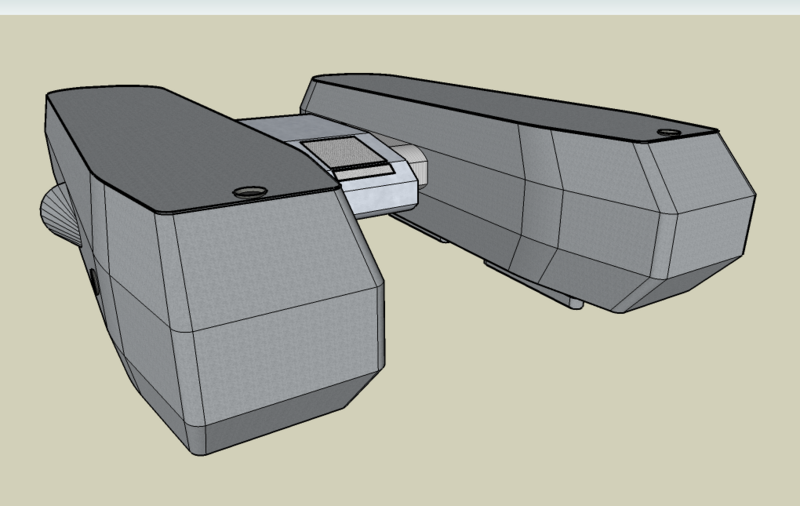
Maybe this is a short-lived trend, and maybe Google, too, will sink into the morass of trying to do too much without making its products remotely fun to use. (If anyone can make Google Earth's new Sky feature work at all well, give me a call.) For now, though - software geeks of the world, rejoice, for Google will conquer all.
Tuesday, 14 August 2007
This concept was not stolen from any number of other websites. Oh dear me no.
A (Hopefully Not Too Spoilerrific) List Of Things I Learnt By Watching Die Hard 4.0
Including A Few Things That I'd Already Learnt By Watching Independence Day, But It's Always Good To Have Them Confirmed
- Putting ".0" on the end of your movie title indicates that it is about something magical called the internet. It does a wonderful job of distracting the audience from the fact that the phrase "die hard" has never really borne that much resemblance to any of the movies in the entire series thus far.
- Hackers are universally skinny nerdish types with no social skills/hygiene whatsoever. They are also universally male.
- Petite Asian women are automatically experts in martial arts.
- It is possible to put a handgun round the edge of a wall, shoot without looking and kill your adversary ten yards away with a single shot. For reference, this feat is approximately equivalent to scoring 180 in darts while blindfolded and facing the wrong way.
- Washington DC drivers, in the midst of a major public emergency, are quite happy to drive at 60mph into a tunnel, despite being able to see traffic coming the other way in the same lane, and will neither slow down nor switch on their headlights should the tunnel lights suddenly fail.
- The previously mentioned hackers are very easy to assassinate by sending them a bit of computer kit with a large amount of C4 plastic explosive inside, then uploading a virus to their systems which causes said C4 to explode. The hackers will not look inside this bit of kit (and will therefore not notice the C4, helpfully labelled "C4"), nor will they, despite being the kind of people who routinely break into other people's systems, have secured their own systems against viruses.
- The people who are performing this assassination will not consider that maybe sending someone round with a gun might be a rather easier and quieter way of doing it, despite the fact that they have in fact sent many people round with guns as a "Plan B".
- Despite having just blown up the hacker's computer, the assassins will then go and collect the computer's hard drive, which apparently still has readable data on it. The fact that hard drives frequently fail under almost perfect conditions, making it very difficult to get any usable data off them even if they haven't exploded, will not occur to the assassins.
- All hackers, along with the FBI Cyberterrorism Unit and any group of bad guys using computers, use impossibly complicated graphical user interfaces, with windows sliding in all over the place and graphical representations of things that really don't need them.
- Surprisingly, even though the said interfaces are so prevalent, no hacker, FBI agent or bad guy will ever, ever, use anything other than the keyboard to control his or her computer.
- All major US governmental organisations, including places like the NSA and CIA, have all of their databases available on the internet, protected by approximately the same level of security that graces a Hotmail account.
- Every computer and security terminal in the world has somewhere on it to plug in your PDA, so that you can use it to hack your way in.
- If you wrote the encryption algorithm on a security checkpoint, it means that you can get past the checkpoint in seconds, despite the fact that you presumably wrote it specifically in order to keep out nosey individuals such as yourself.
- The data networks in movie land can transfer 500TB of data in a few hours. 500TB is an amount of data that you don't normally see, so let me put that into perspective. It is 100,000 times the size of the whole of Wikipedia. The average network cable has a maximum data transfer rate of 100Mb/s. At that speed, which is far higher than that offered by any broadband service available today, it would take considerably more than a year to transfer this much information.
- With enough computing power behind you, it is possible to break into any system remotely within about 10 seconds.
- The main bad guy in any organisation must always wear a black open-collared shirt and a flesh-coloured headset microphone.
Lines Which, To My Pleasant Surprise, Did Not Appear In Die Hard 4.0
- "You can't leave me, dammit! I LOVE YOU!"
- "There's nothing for it, gentlemen. We're going to have to turn off the Internet."
- "Don't worry, I know the guy who programmed this - I bet he left a back door into it."
- "It looks like you are trying to bring down the government of the United States. Can I help you with that?"
And One Which, Unfortunately, Did:
- "It's not a system. It's a country."
Thursday, 1 March 2007
The Logic Of Frustration (or, Why Everything Is Microsoft's Fault)
Observation: The code for the last bit of my research project has not yet been debugged and might not work.
Deductions:
- If I had got into the department before it closed, I would have been able to debug the code.
- If I had reached the department one minute earlier than I did, I would have got in.
- If I had not had to wait at the traffic lights, I would have reached the department at least one minute earlier than I did.
- If I had reached the traffic lights 30 seconds earlier, I would not have had to wait.
- If I had left the house 30 seconds earlier, I would have reached the traffic lights 30 seconds earlier.
- If I had not had a brief instant messenger conversation with one of my friends telling her that I couldn't talk as I was about to leave the house, I would have left the house at least 30 seconds earlier.
- If I had not had an IM client running in the first place, I would not have had that conversation.
- If I had not wanted to check my Hotmail account, I would not have needed to start an IM client.
- If Microsoft did not offer Hotmail accounts, I would not have one.
Wednesday, 7 February 2007
I think the "For Dummies" series needs to bring out a "For People With Rage Issues" version
Ever wondered how to install Linux on your computer? You have? My, what a wonderful surprise! Now everyone gets to listen to my handy step-by-step guide.
...What, not everyone actually wants to? Fine...the people who want to be educated/informed can click the link, then, and everyone else can just go off and do something more interesting...
Oh good, you're still here. On we go then.
Tuesday, 30 January 2007
In Gates' defence, he did hire acrobats for the launch ceremony. That's got to be worth something.
I do like it when news items that happen to come out at around the same time go together so well. Bill Gates announces that Windows Vista is "dramatically more secure than any other operating system released"...
...and in a completely unrelated story, some hacker manages to break Vista's copy-protection system within a week of its launch.
Gives you a nice warm glow inside, doesn't it?
Tuesday, 16 January 2007
On the plus side, they things they do make well are EXTREMELY shiny
I'm typing this from the Psychology computer lab, as I've just come out of my Visual Search practical. It wasn't exactly thrilling, so I'll spare you the details - I was just interested to see that, just like the Stereoscopic Vision practical last term, we used old Power Macs to run the experiment. And when I say, old, I mean pretty darned old - these things are a good ten to fifteen years of age, which is seventy to a hundred and five in dog years, or about eighteen million in computer development terms.
I'm not a big user of Macs - my only non-Windows experience thus far has been brief attempts at understanding what on earth Linux is all about - but I've been pretty impressed thus far by these old machines. The Mac OS takes a bit of getting used to - idiosyncrasies like dragging the floppy disk into the wastebasket when you've finished with it make absolutely no sense at first, but I suppose it's roughly as sensible as clicking "Start" to shut down. Still, it looks nice, particularly little touches like the flickering when you select something, which looks very Hollywood. The hardware's good too, with perfectly reliable mice (who really needs two buttons, anyway?) and lovely clicky keyboards. Plus, there's the bonus that because everything was made by the same company, it's almost always going to work.
So why, WHY, in the name of all that is sensible, did they put the Power button right below the floppy drive? At least two people in my class accidentally switched off their computers when they thought they were ejecting the disk. Likewise, why make it impossible to reach the desktop without clearing away window after window? And why build in elements to programs that mean you can't edit things, even if you could ten seconds ago, with no explanation at all?
It's worth noting that Apple still does stupid stuff like this - I'm never going to buy an iPod until they make the batteries user-replaceable and widely available, for instance. Likewise, their anticompetitive love affair with DRM, crippling your music files and making them playable only on their hardware, is a marketing decision that seems to have absolutely no basis in the wants and needs of their customers. Even in their newest stuff, such as the iPhone, you'll find these problems - another non-replaceable battery, a deal tying you to only one network service provider, no user-installable apps except for those made by Apple, despite the phone otherwise running a full version of Mac OS X.
Weird, really. Maybe the key to finally putting a knife through Microsoft's cold, merciless heart is not so much increasing one's cleverness - there's clearly plenty of that around - maybe it's actually a case of getting rid of the rampant vein of sheer mad stupidity running through the centre of one's whole operation. Until they do, I don't think I'll be taking a bite of the Apple any time soon.
Saturday, 6 January 2007
The worst part is that we spent over £100 on Office, so I feel honour-bound to keep using it
I've talked about this before, but it cannot be said enough; whoever is responsible for making Microsoft Word:
- Move graphs from wherever you originally put them
- Decide that a) hard against the very top of the page, b) hard against the very bottom of the page, or c) right on top of the previous graph you placed are all very sensible places to move your graph
- Steadfastly refuse to let a text box within half a mile of a graph, even if it's patently obvious that you want to group the two together because you did exactly the same thing thirty seconds ago
- Randomly grey-out the "Print only the even pages" box because it feels like it
- Make replies to an email dark blue, and make that default impossible to change in any of the templates
- Decide that one of your documents should actually be a different one, and therefore copy the entire contents of Document A into Document B, deleting the original contents of Document B and insisting that it never existed, while keeping the filesize the same as it was when Document B actually did exist and keeping Document A just the same as it was, therefore necessitating the redoing of about four solid days of work (that actually happened once)
- Vastly inflate filesizes, to the point where a 50-page text document with a few digital photos, none of which could possibly have been more than about 50 KB, takes up 100MB
- Decide that not only are page headers and footers exempt from spell checking, but that this exemption should sometimes and without warning suddenly expand to the entire contents of your document, thus negating one of the very few halfway useful functions of the program
- Despite all of this, hold a frickin' near-monopoly on word processing software


